
Chrono&Cash1.2.7 - Google Play
You'll be able to see results in few seconds.
Publisher Description
support, tip and tricks: http://www.orangepixel.net/forum/
"You’ll constantly be trying a new challenge and will even get your friends involved, just to beat their high scores." 8.5/10 - Paranerds
"The tightness of the design of Chrono & Cash makes it one of Orangepixel’s best games yet" - 8/10 Android rundown
***
Retro coin-operated gameplay is back - from the guys behind Meganoid, Stardash and INC !
***
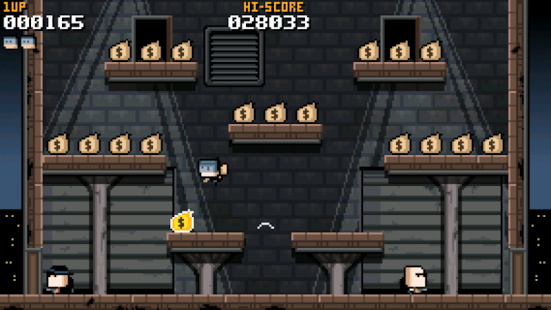
You play as Cash, a talented thief who, accompanied by his trusty Chrono robot CR2, travels through time to rob from the bad and… well.. let’s just keep it in the middle what he does with the things he robs!
Every level is a single screen with a collection of platforms and treasure, grab it, and advance to the next level! … just avoid contact with the locals!
***
Extra cool features:
With the heavy inspiration of arcades, we decided to make this game work in both landscape (horizontal) AND portrait (vertical) mode for the real Arcade feeling.
Unlockable disguises! just some names you will be able to unlock: Burnie, Dino, Dr Cavor, Commander Pixman, and more!
Score challenges: complete the challenges given and increase your score multiplier for even higher scores!
Use the optional twitter integration to brag about your highscore!
Compatible with the iCade .. yes the iCade also works with Android tablets ;)
***
Find any bugs? tell us on twitter @orangepixel, facebook.com/orangepixel or mail us, and we will try and get them fixed ASAP!
Xperia PLAY Optimized
MOGA controller supported!
About Chrono&Cash
The company that develops Chrono&Cash is OrangePixel. The latest version released by its developer is 1.2.7.
To install Chrono&Cash on your Android device, just click the green Continue To App button above to start the installation process. The app is listed on our website since 2013-07-05 and was downloaded 0 times. We have already checked if the download link is safe, however for your own protection we recommend that you scan the downloaded app with your antivirus. Your antivirus may detect the Chrono&Cash as malware as malware if the download link to com.orangepixel.chronocash is broken.
How to install Chrono&Cash on your Android device:
- Click on the Continue To App button on our website. This will redirect you to Google Play.
- Once the Chrono&Cash is shown in the Google Play listing of your Android device, you can start its download and installation. Tap on the Install button located below the search bar and to the right of the app icon.
- A pop-up window with the permissions required by Chrono&Cash will be shown. Click on Accept to continue the process.
- Chrono&Cash will be downloaded onto your device, displaying a progress. Once the download completes, the installation will start and you'll get a notification after the installation is finished.
Program Details
System requirements
Download information
Pricing
Version History
version 1.2.7
posted on 2013-07-05
* Minor visual fixes,* Rare Collectables ! see if you can grab em all ;),* Statusbar transparent , easier to spot missing stuff,* extra life now also given at 50k, 60k and 70k scores,* various small improvements
version 1.2.6
posted on 2013-01-18
Several fixes and updates
Disclaimer
Official Google Play Link
We do not host Chrono&Cash on our servers. We did not scan it for viruses, adware, spyware or other type of malware. This app is hosted by Google and passed their terms and conditions to be listed there. We recommend caution when installing it.
The Google Play link for Chrono&Cash is provided to you by apps112.com without any warranties, representations or guarantees of any kind, so access it at your own risk.
If you have questions regarding this particular app contact the publisher directly. For questions about the functionalities of apps112.com contact us.
